
Price drop spotted on Amazon!
now
Know what your competitors charge before your customers do.
Stakeout monitors competitor prices on Amazon and Google Shopping and delivers daily reports — so you can make smarter pricing decisions.
Price drop spotted on Amazon!
now
Stakeout monitors competitor prices on Amazon and Google Shopping and delivers daily reports — so you can make smarter pricing decisions.
Set up once, get daily intel. No spreadsheets, no browser tabs, no guesswork.
Pick your products, choose your markets, set your schedule. Stakeout handles the rest.
Get a competitor price report every day at the time you choose. See who's cheaper, who raised prices, and where you stand.
Track competitor price history with visual charts. See the bigger picture before making pricing decisions.
No more juggling browser tabs. Stakeout pulls competitor prices into a single view inside your Shopify admin, so you always know where you stand.
Choose which products to monitor from your Shopify catalog.
Stakeout checks Amazon, Google Shopping and Google search results for prices daily. We use your product title and the UPC/EAN/Barcode Number if set to search for competitor prices.
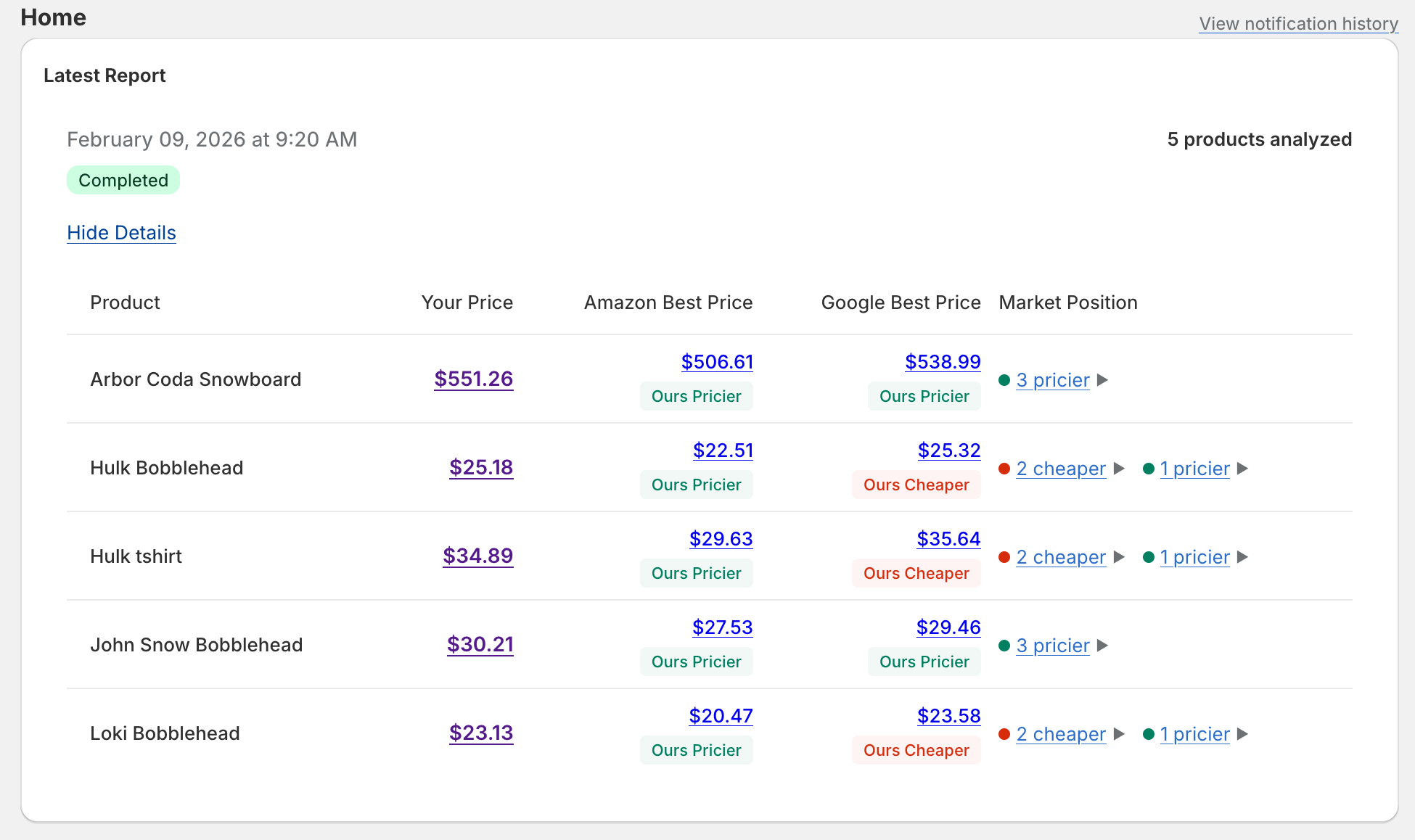
A competitor price report lands in your dashboard every morning. You can use this for a super easy price comparison
Answers to the things merchants ask before installing Stakeout.
Stakeout is a Shopify app that automatically monitors competitor prices for your products. Every day, it checks prices on Amazon and Google Shopping and delivers a report showing how your prices compare to the market — so you can stay competitive without manual research.
After installing Stakeout, you'll be guided through a quick 4-step setup:
1. Choose your timezone and the time of day you'd like your daily report to run.
2. Select which Amazon marketplace and Google Shopping country to search.
3. Pick the products from your store you want to monitor.
4. Review your settings and complete the setup.
Once finished, your first report will run at the next scheduled time.
Yes. You can update your timezone, report schedule, marketplace preferences, and monitored products at any time from the Settings page. Changes take effect on your next scheduled report.
Your first report will be generated at the next occurrence of your chosen daily report time. For example, if you complete setup at 10 AM and your report is scheduled for 2 PM, you'll see results that same afternoon. If the scheduled time has already passed for the day, the report will run the following day.
Stakeout runs a full competitor price check once per day at the time you configure in Settings. This gives you a consistent daily snapshot of the competitive landscape.
Yes, If you have your UPC/EAN Number stored in the barcode field we will also search Google for that number.
Stakeout searches two major sources:
- Amazon — using the marketplace you selected (e.g. amazon.com, amazon.co.uk)
- Google Shopping — using the country you selected
Also if you have a GTIN / UPC / EAN / ISBN number stored in the barcode field we will also search Google for that barcode number.
Sponsored listings and results without a clear price are automatically filtered out, so you only see genuine competitor offers.
Each report includes a summary for every monitored product showing:
- Your current price
- The best price found on Amazon
- The best price found on Google Shopping
- The best price found when searching Google for your UPC / EAN / ISBN (If you have this number stored in the barcode field)
- A breakdown of how many competitors are priced higher, lower, or the same as you
You can click on any count to see the individual competitor details.
Market Position summarises how your price compares to competitors found in that report. It shows the number of competitors that are more expensive, less expensive, or priced the same as you. This gives you a quick sense of where you stand without having to review every competitor individually.
Yes. Stakeout can send you a daily summary email when each report completes. You can enable or disable this from the Settings page under email preferences. The email is sent to the store owner's email address on file with Shopify.
Go to the Products page and use the product picker to add new products from your Shopify catalog. To stop monitoring a product, click the remove button next to it. Changes take effect on your next scheduled report.
Yes, the number of products you can monitor depends on your plan:
- Monitor plan: up to 5 products
- Analyze plan: up to 25 products
- Optimize plan: up to 50 products
You can upgrade your plan at any time to monitor more products.
If your product has multiple variants (e.g. different sizes or colours), Stakeout uses a pricing strategy to determine a single representative price for comparison. You can choose from:
- Median price — the middle value across all variants (default)
- Highest — uses the most expensive variant's price
- Lowest — uses the cheapest variant's price
- Selected variant — lets you pick a specific variant per product
You can change the strategy in Settings at any time.
If a product is removed from your Shopify store, Stakeout will no longer be able to fetch its current price during the next report. Past reports that included the product will still be available for review.
Stakeout offers three paid plans:
- Monitor ($19/month) — track up to 5 products, and receive daily reports
- Analyze ($49/month) — track up to 25 products, and see historical price trends in a graph
- Optimize ($99/month) — track up to 50 products, and see historical price trends in a graph
All plans include daily competitor checks on both Amazon and Google Shopping.
Yes we have a 5 day free trial on the Monitor plan, which allows you to monitor up to 5 products. Also Development stores have a unlimited free trial, which allows you to monitor 1 product.
You can change your plan at any time by visiting the Manage Subscription link in the app. This will take you to the Shopify billing page where you can choose a different plan. Upgrades take effect immediately. Downgrades only occur at the end of your current billing period.
When you downgrade it only takes effect at the end of your current billing period so if you started the subscription at the beginning of the month, the downgrade will only take effect at the beginning of the next month. This means that in your next billing period you will be charged the lower price and the lower plans limit will take effect. If you're monitoring more products than the new plan allows, new reports will only include products up to the new limit. Historical reports will still include all the products you were monitoring at the old plan level.
You can cancel your Stakeout subscription at any time through the Manage Subscription link, which takes you to the Shopify billing page. After cancellation, your existing reports remain accessible, but no new reports will be generated.
Go to Settings and update the Daily Report Time. You can choose any hour of the day. Reports will run at that time in the timezone you've configured. The change takes effect from the next scheduled run.
Yes. In Settings, you can select a different Amazon marketplace (e.g. amazon.com, amazon.co.uk, amazon.de) and Google Shopping country. The new preferences will be used starting with your next report.
In Settings, you'll find an option to enable or disable daily report emails. When disabled, reports will still be generated and available in the app — you just won't receive an email notification.
This can happen for a few reasons:
- The product title may not closely match how it's listed on Amazon or Google Shopping. Try checking the title in your Shopify admin.
- The product may be very niche or not widely sold on those marketplaces.
- The selected Amazon marketplace or Google Shopping country may not carry that product.
- The confidence filter may be set to show only results with a high confidence rating (We rate each result with either a high, medium or low confidence rating)
High means we are very confident the product we found matches your product. Low means we are not confident that your product matches the found product (we think that the found product has a very low chance of being similar to your product).
So if there are no matches you can set the confidence filter lower in settings to see if that helps.
****
If the issue persists, try adjusting your marketplace settings or contact support.
Reports are scheduled to run at the hour you selected, but processing happens in the background and may take a few minutes depending on how many products are being checked. If your report hasn't appeared after 30 minutes, please contact support so we can investigate.
First, make sure daily report emails are enabled in Settings. Then check that your Shopify store has a valid owner email address, as that's where reports are sent. Also check your spam or junk folder. If everything looks correct and you're still not receiving emails, please contact support.
You can reach the Stakeout support team directly from within the app using the Support page. Submit a ticket with your question or issue, and we'll get back to you as soon as possible.
Install Stakeout free and get your first report tomorrow.
Install on Shopify